Why Your EIN Application Failed (And How to Get Approved Fast)

Gary Gal
Across hundreds of filings, I’ve seen how a single small error can cause an EIN application to get rejected and delay a business launch. In my work with clients at Andemax, we’ve fixed repeated application issues that most people overlook.
Because of these patterns, most EIN application failures are due to mismatches, incomplete forms, or filing errors in the IRS system. To get approved fast, you must correct details, follow IRS rules exactly, and submit a clean, accurate application.
So, if your application was denied or delayed, you’re not stuck; you just need a better approach. Now, let’s step into the key takeaways to see what you actually need to know.
Key Takeaways
Match IRS records exactly: Even small name or SSN/ITIN errors trigger instant rejection and delay approval.
Complete every required field: Missing or inconsistent data causes automatic system failure because the IRS will not process partial applications.
Select the correct entity type: Wrong classification leads to rejection and can create downstream tax complications.
Avoid duplicate submissions: Multiple filings can flag your record and delay or block processing entirely.
Next, we’ll break down each one to show where these issues happen and how to fix them step by step.
Secure a smooth EIN approval process with accurate, compliant filings that reduce the risk of delays or rejection. [Schedule Your Confidential EIN Application Review With Us] or call (800) 344-5226 for expert guidance today.
Common Reasons an EIN Application Fails
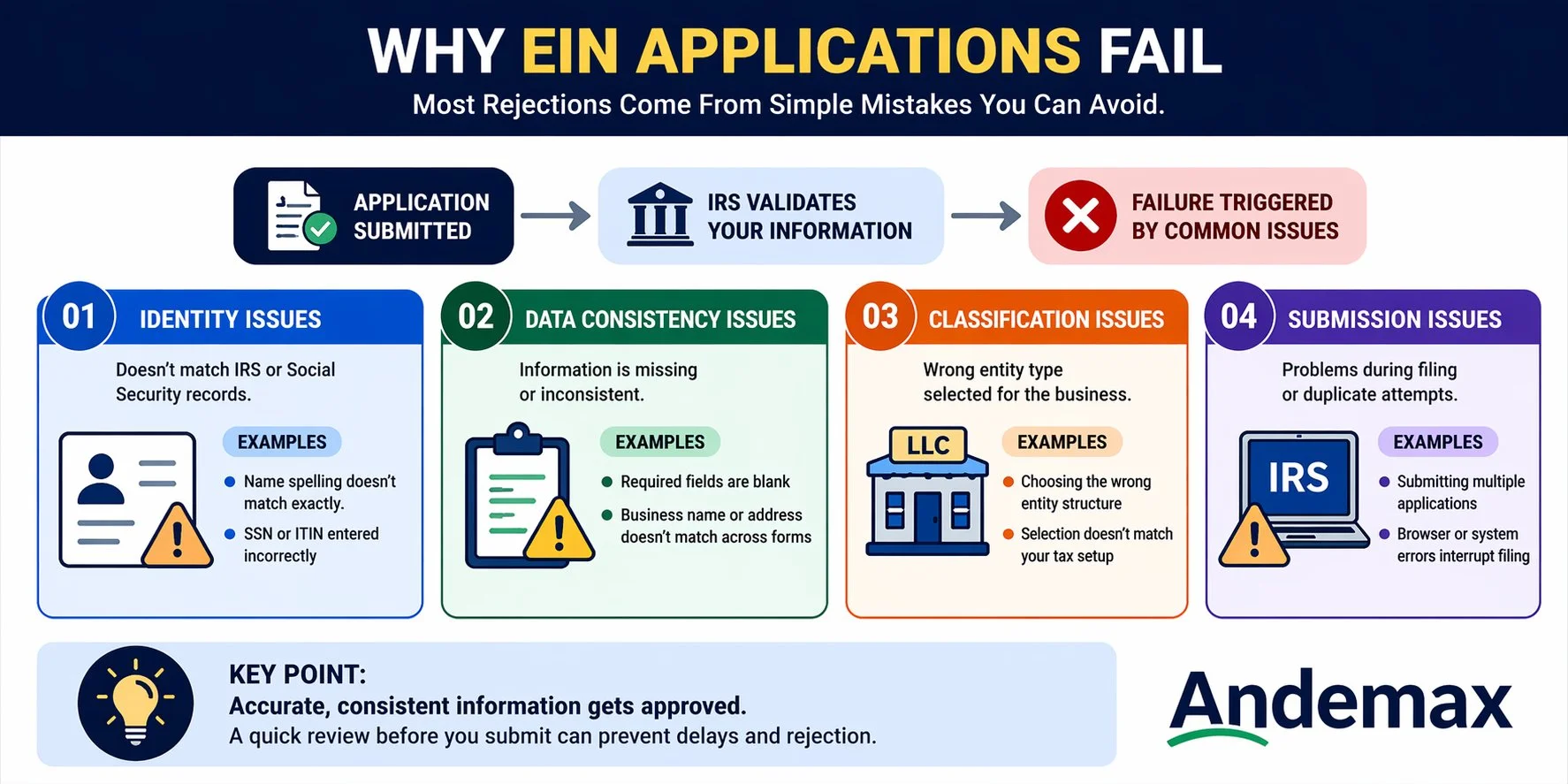
EIN application failure occurs when the submitted information does not meet IRS validation requirements. Most failures stem from data mismatches, missing fields, or incorrect entity classification during automated checks.
From here, you can break down the exact reasons behind rejection and see how each issue affects your approval.
Name and Taxpayer Identification Mismatch
A mismatch occurs when the legal name or Taxpayer Identification Number does not align with IRS or Social Security records. This creates a conflict that prevents identity verification and stops processing immediately. Even minor spelling differences can trigger this issue.
Common mismatch triggers:
Incorrect spelling of legal name
Using a nickname instead of the official name
Typing errors in the SSN or ITIN
Outdated name after legal changes
When submitting, every character must match official records exactly. Consistency across documents is essential for passing IRS validation.
Incorrect or Inconsistent Business Information
Inconsistent business details confuse the IRS system because it relies on structured data matching. This includes variations in business address, trade name, or entity structure. Even small inconsistencies can create a mismatch signal.
Data Field | Common Error | Resulting Issue |
Business Name | Abbreviations used inconsistently | Record mismatch |
Address | Old or incomplete address | Verification failure |
Entity Type | Conflicting selections | System rejection |
Accuracy across all fields ensures the IRS system can validate your business identity without conflict. Consistency is more important than complexity in this stage.
Missing or Incomplete Required Fields
Incomplete applications are one of the fastest reasons for rejection because the IRS system cannot process partial data. Required fields exist to confirm identity, structure, and responsible party details. Leaving any blank creates an automatic stop in processing.
Key fields often missed:
Responsible party information
Legal business name
Physical business address
Reason for applying
A complete review before submission reduces the risk of system-level rejection significantly. Every required field must be filled with verified information.
Wrong Entity Type Selection
Entity type defines how the IRS classifies the business for tax purposes. Selecting the wrong type changes how the system processes the application and can lead to immediate denial. This is often caused by a misunderstanding of business structures.
Step-by-step selection workflow:
Identify the business structure clearly
Match structure to IRS entity categories
Confirm tax obligations for the chosen type
Verify classification before submission
Choosing correctly from the beginning prevents processing delays and avoids the need for reapplication.
Duplicate Applications Submitted
Submitting multiple EIN applications for the same business can trigger duplicate detection systems. The IRS treats repeated submissions as conflicting records, which can block approval entirely. This often happens when applicants assume the first attempt failed.
Duplicate prevention checklist:
Wait for the official IRS response before reapplying
Avoid submitting multiple versions on different platforms
Track application status before taking action
Confirm the submission confirmation number
One application per business entity is the safest approach. Patience is often required to avoid unnecessary rejection signals.
IRS System or Filing Entry Errors
System errors occur when technical issues or formatting problems interrupt submission processing. These errors may not always be visible to the applicant but still affect approval outcomes. They are often caused by browser issues or incorrect data formatting.
Error Source | Description | Impact |
Browser glitch | Session timeout during submission | Data loss |
Formatting issue | Invalid characters in fields | Processing failure |
System timeout | IRS server interruption | Incomplete filing |
Ensuring a stable connection and clean data entry reduces technical failure risk significantly.
How to Fix a Failed EIN Application and Get Approved Faster
Fixing a failed EIN application involves identifying errors and aligning all data with official IRS records. Many applicants repeat mistakes by resubmitting without correcting inconsistencies or verifying required details.
At this point, you can follow the key correction steps that help fix errors and speed up your approval.
How to Correct Information Before Reapplying
Correcting errors means reviewing every field against official documents and ensuring full consistency. This step is critical because even small mismatches will trigger another failure. Accuracy must be verified before any new submission.
Correction workflow:
Compare all entries with legal documents
Fix spelling, formatting, and structural errors
Confirm entity type alignment
Validate the responsible party details
Review submission one final time
Careful correction reduces repeat rejection risk and improves approval probability on the next attempt.
When You Should Refile Instead of Waiting
Refiling is not always the best immediate step, especially if the IRS has not completed processing. Understanding timing prevents unnecessary duplicate submissions that can complicate records.
Situation | Recommended Action |
No confirmation received | Wait and verify status |
Confirmed rejection | Correct and refile |
Data error identified | Fix before resubmission |
Duplicate detected | Pause and reconcile records |
Strategic timing ensures that reapplications do not create additional processing conflicts.
Steps to Prevent Another Application Failure
Preventing future failure depends on building a structured verification process before submission. Most repeat issues happen because applicants skip final validation steps.
Prevention workflow:
Review all entries against official records
Confirm consistency across every field
Validate entity classification carefully
Check formatting and input accuracy
Submit only after full verification
A disciplined review process significantly reduces the chance of repeated rejection.
Final Checks Before You Submit Your EIN Application
Final checks ensure that all application data is complete, accurate, and consistent before IRS submission. Skipping validation often leads to preventable rejection caused by minor but critical errors.
Before submitting, you can go through essential checks that help secure a smooth and successful approval process.
Pre-Submission Checklist for Accuracy
A structured checklist ensures no critical field is missed during submission. This step is essential for eliminating simple but costly mistakes.
Final checklist:
Legal name matches official records
SSN or ITIN is accurate
Business address is complete and current
Entity type is correctly selected
Responsible party information is included
Completing this checklist reduces rejection risk significantly and improves processing speed.
Simple Validation Steps to Avoid Rejection Again
Validation ensures that all submitted data is internally consistent and matches external records. It prevents system-level flags that cause automatic denial.
Validation Step | Purpose | Outcome |
Identity check | Confirm legal name accuracy | Prevent mismatch |
Address check | Ensure location consistency | Avoid rejection |
Entity check | Verify classification | Correct tax setup |
For a step-by-step walkthrough of the initial application process, see this detailed EIN application guide.
How an Accounting Firm Can Help You Secure EIN Approval Faster
Accounting firms streamline EIN approval by ensuring every filing meets strict IRS accuracy and compliance standards. Many applicants struggle with delays or rejection caused by small data errors, mismatched records, or incomplete forms.
Below are key support actions showing how professional review reduces mistakes and improves approval speed:
Review business details for accuracy before IRS submission
Verify legal name, SSN or ITIN, and entity classification
Fix mismatches that often trigger EIN application delays or rejection
Ensure all required fields, including the responsible party info, are complete
Confirm the correct entity type based on the business structure
Prevent duplicate submissions that may cause processing issues
Provide a final compliance check before filing with the IRS
Keep your EIN application accurate, complete, and ready for fast IRS approval by partnering with Andemax for expert accounting support.
Summary Table: Why EIN Applications Fail and How to Fix Them
Problem Area | Main Cause | Fix Strategy |
Identity mismatch | Name or SSN errors | Match official records exactly |
Business inconsistency | Conflicting details | Standardize all entries |
Missing data | Incomplete form fields | Fill all required sections |
Wrong entity type | Misclassification | Verify structure before filing |
Duplicate filing | Multiple submissions | Submit once and wait |
System errors | Technical issues | Ensure a clean submission environment |
Take control of your EIN application process with accurate filings that help prevent costly delays or rejections. [Schedule Your Free Confidential EIN review With Us] or call (800) 344-5226 for expert assistance today.
Conclusion
An EIN application gets rejected when small details are wrong or do not match official records. Many cases labeled as an EIN application rejected result from simple errors that were easy to fix early.
One frequent issue is using slightly different business names across forms, which can quietly cause IRS rejection. Matching every detail exactly with official documents makes a big difference.
Getting this wrong can delay your business and create stress, while getting it right saves time and avoids problems. For a confidential review, contact our Great Neck Estates team at Andemax on (800) 344-5226 today.
Frequently Asked Questions
Why did my EIN application fail immediately?
Immediate failure usually results from identity mismatches or incomplete required fields. The IRS system validates entries instantly and rejects anything inconsistent.
Can I reapply after an EIN application failure?
Yes, but only after correcting the original errors. Reapplying without fixes often leads to repeated rejection.
How long should I wait before reapplying?
Wait until you confirm the status of your first application. Reapplying too soon can create duplicate record issues.
Does the IRS manually review all EIN applications?
No, most applications are processed automatically. Only flagged cases are reviewed manually for further validation.
What is the most common EIN rejection reason?
Name and Taxpayer Identification mismatches are the most common cause. Even small spelling errors can trigger rejection.
Can I fix an EIN application after submitting it?
No, submitted applications cannot be edited. Corrections require a new application after identifying the issue.
Does business type affect EIN approval?
Yes, selecting the wrong entity type can cause immediate rejection. Correct classification is required for proper processing.